Why Pip has one orange
Pip uses one accent colour and almost nothing else. What the orange marks, the colour setting we took out, and the one exception.
Pip has one accent colour. It’s an orange, #ff4d00, and it sits on warm neutrals: an off-white page in Light, a charcoal one in Dark.
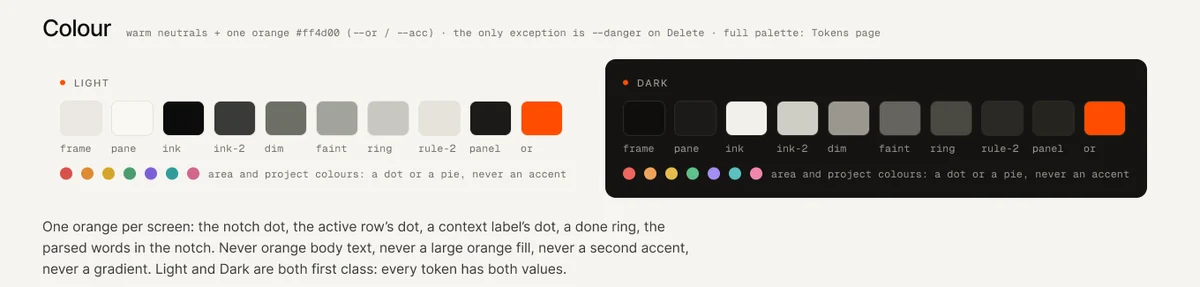
It wasn’t always that way. An early build had a colour setting, a row of swatches so you could make Pip blue, green or purple, and for a while extra colours were going to be part of Pro. We took the setting out before anyone outside saw it.
What the orange marks
In Pip the orange appears in a handful of places, and each one is either the way in or a moment where something happened.
- The dot at the top of the screen, and the round button in the corner that does the same job. Every task and note starts there.
- The words Pip understood while you type, before you press Enter.
- The ring of a task when you tick it off.
- A link from one note to another, and a small dot beside the list you’re looking at.


Nothing else gets it. Not the headings, not the sidebar, and not a badge counting what you haven’t done. If the orange were also the colour of every button, you’d stop seeing it within a day, and the moment Pip understood your Thursday would look the same as a menu.
Why you can’t pick your own
A colour picker looks generous, and it’s one of the first things people ask for. But a palette that changes per person has to work with every colour, so the design ends up leaning on none of them. With one orange, every screen can be checked in Light and Dark against that one value.
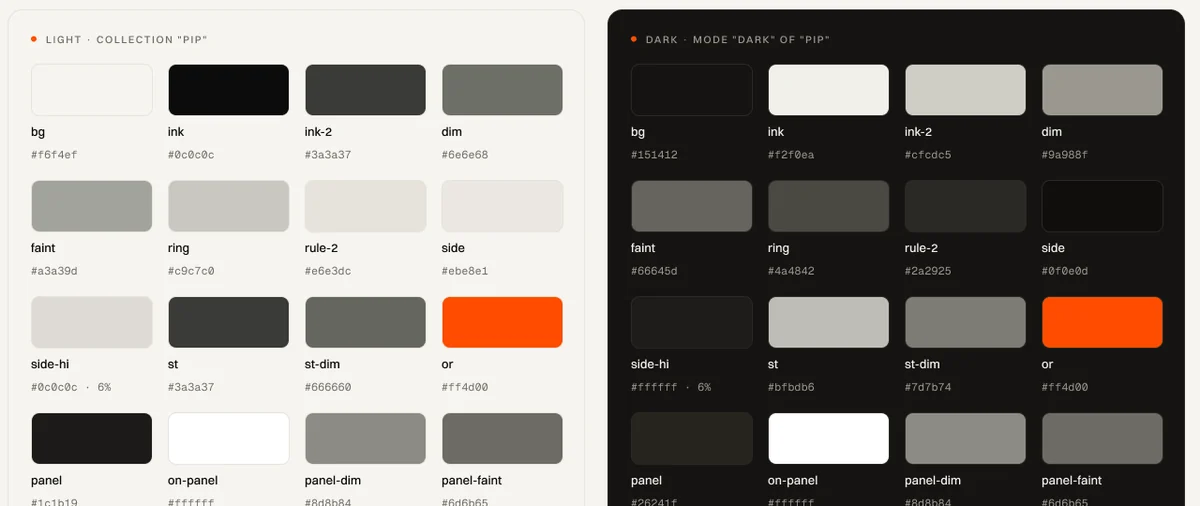
There are no gradients either. A gradient is two colours taking turns, and Pip only has the one.
The colour itself
It sits very close to the orange engineers call international orange, used on things that need to be seen against the sky. On a calm page it does the same job at a much smaller size: a ten-pixel dot you can find without looking for it.
The small colours
A few things do carry another colour, and none of them is allowed to act as an accent. A project can have a colour of its own, but it only shows in the little pie that fills as its tasks get done. A date that has already passed turns red. Code inside a note is coloured the way code editors colour it.
The one exception
Deleting is the one action you might regret, so Delete is a quiet red. Even then the delete can be undone straight away, and deleted things wait in Recently deleted for thirty days.

If Pip ever gets a second accent, it will have to mean something as clear as “this can’t be taken back”. So far nothing else has.